Why cross‑device typing matters now
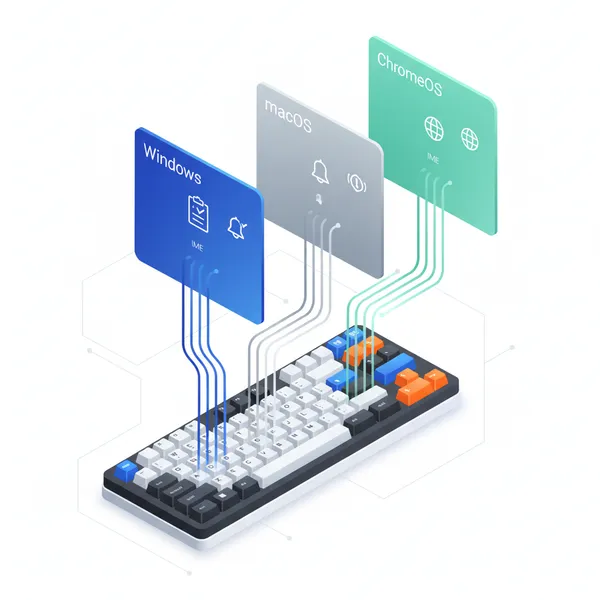
If you write for a living or love speed‑typing challenges, you no longer have to peck on a phone display to answer messages, edit notes, or post to social. Apple’s iPhone Mirroring (macOS Sequoia), Microsoft’s Phone Link (Windows), and ChromeOS Phone Hub app streaming (Pixel → Chromebook) all let you type into mobile apps with your desktop keyboard — and even carry text across devices via shared clipboards. Below is a feature snapshot, a practical benchmark you can run at home, and the power‑user settings that make a real difference to WPM, end‑to‑end input latency, shortcut/IME parity, and clipboard or notification hand‑off.
What each platform actually does
macOS Sequoia + iPhone Mirroring
Apple’s iPhone Mirroring lets you fully control your iPhone from a Mac using your Mac’s keyboard, mouse/trackpad, and shortcuts. It requires a Mac on macOS Sequoia 15 or later (Apple silicon or T2‑equipped Intel), an iPhone on iOS 18 or later, the same Apple ID with 2FA, and Bluetooth/Wi‑Fi enabled. It also brings iPhone notifications to your Mac; Apple notes the feature is currently unavailable in the EU. You can copy items between devices via Universal Clipboard or drag‑and‑drop (for example, drop a photo into a mirrored Messages thread). Keyboard shortcuts like Command‑1 (Home), Command‑2 (App Switcher), and Command‑3 (Search) speed navigation. (support.apple.com)
Tip for multilingual typists: set the iPhone’s hardware keyboard layout so your Mac keyboard maps correctly (iPhone > Settings > General > Keyboard > Hardware Keyboard). (support.apple.com)
Windows 11 + Phone Link (Android)
On Windows, Phone Link mirrors notifications and lets you open your Android apps on the PC (Phone screen/Apps), then type with your PC’s keyboard, mouse, touch, or even pen. Microsoft documents that you can use PC input devices to open, type, scroll, and interact, and offers rich app control on many Samsung and select Android models. (support.microsoft.com)
For cross‑device text movement, enable Phone Link’s Cross‑device copy and paste to copy text/images between phone and PC. Support varies by OEM (Samsung One UI devices and several others); Microsoft lists supported families and the on/off toggle path in Settings. Phone Link also has dedicated shortcuts (e.g., Ctrl+P to open Phone screen on supported Androids; Ctrl+N for a new message), and feature hotkeys (Ctrl+1/2/3/4) depending on device capabilities. (support.microsoft.com)
ChromeOS + Phone Hub app streaming (Pixel)
ChromeOS Phone Hub can stream Pixel phone apps into resizable ChromeOS windows so you can interact from the Chromebook — ideal for messaging and quick edits. Requirements include ChromeOS M115+ on the Chromebook and a Pixel 4a or later on Android 13+; both devices should be nearby on the same Wi‑Fi (or you can auto‑tether if needed). Phone Hub also mirrors phone notifications on your Chromebook. (support.google.com)
Note: Google’s help page highlights interaction (trackpad/touch) and app/connection constraints; it doesn’t advertise a universal, cross‑device clipboard like Apple’s or Microsoft’s. In practice, you paste within the streamed app window (the phone’s clipboard), and for broader sharing use ChromeOS/Android share targets. ChromeOS 115 enterprise notes confirm the app‑streaming integration. (support.google.com)
A simple, repeatable cross‑ecosystem typing benchmark
Run these steps the same way on each platform (Mac+iPhone Mirroring; Windows+Phone Link (Android); Chromebook+Phone Hub app streaming):
1) Warm‑up and WPM
- Open a familiar mobile app (e.g., Notes/Keep/Messages) in the mirrored/app‑streamed window.
- Take two 1‑minute runs of a standard typing test paragraph or your own snippet. Record WPM and error rate.
- Repeat twice using different keyboard links: wired USB or 2.4 GHz dongle vs Bluetooth. In independent testing, wireless keyboards using a dedicated 2.4 GHz USB receiver typically have lower latency than Bluetooth; some modern wireless receivers now rival wired latency. (rtings.com)
2) End‑to‑end input latency
- Use your phone’s 120–240 fps slow‑motion camera aimed at the keyboard and mirrored app. Tap a single key repeatedly; on playback, count frames from key press to character render. Compare Bluetooth vs 2.4 GHz vs wired on the same setup to isolate transport effects (environmental RF noise can skew Bluetooth). Independent reviews consistently note Bluetooth incurs more overhead than 2.4 GHz receiver links. (rtings.com)
3) Shortcut/IME parity check
- macOS+iPhone: Verify Command‑1/2/3 shortcuts and that your iPhone hardware keyboard layout matches your Mac. Try switching iPhone input languages and typing accented characters or CJK. (support.apple.com)
- Windows+Phone Link: Use Ctrl+P (open Phone screen, if supported) and Ctrl+N (new message). If you type in multiple languages, Phone Link’s “Phone screen” honors Android’s physical‑keyboard language switching (often Shift+Space by default) — test and adjust on your phone if needed. (support.microsoft.com)
- ChromeOS+Phone Hub: In a streamed app, confirm your Android keyboard’s physical‑keyboard shortcut for language switching (e.g., Shift+Space or a custom binding under Physical keyboard > Change language shortcut) or use Gboard’s language switching. (android.stackexchange.com)
4) Clipboard and notification hand‑off
- macOS+iPhone: Copy on one device and paste on the other with Universal Clipboard; confirm iPhone notifications arriving on Mac during mirroring. (support.apple.com)
- Windows+Phone Link: Toggle Cross‑device copy and paste, then copy from PC → paste in a phone app (and vice‑versa). Check mirrored notifications. (support.microsoft.com)
- ChromeOS+Phone Hub: Validate phone notifications appear on the Chromebook and that paste operations inside the streamed window reflect the phone’s clipboard. (support.google.com)
Power‑user settings that actually help
- Prefer wired or 2.4 GHz USB‑receiver keyboards for the lowest typing latency; test your own setup because results vary by RF environment and firmware. (rtings.com)
- Keep the phone and computer on the same stable, high‑bandwidth Wi‑Fi (5/6 GHz) and close together. Both Apple and Google document proximity and same‑network requirements for the smoothest mirroring/streaming. If a shared Wi‑Fi isn’t possible for Pixel↔Chromebook, Phone Hub can tether the phone’s hotspot to establish a compatible local link. (support.google.com)
- macOS+iPhone Mirroring:
- Enable Universal Clipboard (for true copy/paste between Mac and iPhone).
- In iPhone > Hardware Keyboard, select your Mac’s layout to avoid mis‑mapped symbols; learn Command‑1/2/3 for navigation.
- Note Apple’s current availability caveat: iPhone Mirroring is unavailable in the EU as of Apple’s latest support doc. (support.apple.com)
- Windows+Phone Link (Android):
- Turn on Cross‑device copy and paste (Settings > Features) to move text/images instantly.
- Use Phone Link shortcuts (Ctrl+1/2/3/4 to jump features, Ctrl+P to open Phone screen, Ctrl+N for new message).
- If you type in multiple languages, set Android’s Physical keyboard > Change language shortcut to something you won’t hit accidentally. (support.microsoft.com)
- ChromeOS+Phone Hub (Pixel):
- Confirm ChromeOS M115+ and a supported Pixel on Android 13+; keep devices nearby on the same Wi‑Fi (or use Phone Hub hotspot).
- For multilingual input, rely on Android/Gboard language switching (Shift+Space or hold Space on Gboard).
- Expect phone‑clipboard behavior inside the streamed window; there’s no documented universal clipboard between phone and Chromebook in Phone Hub help. (support.google.com)
What to expect from your results
- WPM: Most users see similar raw WPM across ecosystems when network conditions are good and autocorrect/prediction are comparable. Any Bluetooth‑only keyboard or congested RF environment may shave off a few words per minute due to added input jitter. Independent testing frameworks suggest proprietary 2.4 GHz receivers typically beat Bluetooth for latency consistency. (rtings.com)
- Latency: End‑to‑end lag is the sum of keyboard transport, OS processing, and the mirroring/streaming pipeline. Lower it by using wired/2.4 GHz keyboards and strong local Wi‑Fi. (rtings.com)
- Shortcuts/IME parity: Apple exposes mirrored navigation via Command keys; Microsoft publishes a full Phone Link shortcut list; Android’s physical‑keyboard language switching applies when you’re typing into the streamed phone UI. Validate and customize before your real test runs. (support.apple.com)
Bottom line: who should use what?
- macOS users deep in iOS apps and services will get the most seamless typing and copy‑paste via iPhone Mirroring + Universal Clipboard — with the caveat that iPhone Mirroring isn’t available in the EU (per Apple’s current note). (support.apple.com)
- Windows power typists paired with Android (especially Samsung/other supported models) get robust app control and cross‑device clipboard — learn the Phone Link shortcuts and enable copy/paste sync. (support.microsoft.com)
- Chromebook users with a recent Pixel get lightweight, zero‑install app access and notification mirroring. Treat clipboard behavior as phone‑scoped inside the stream and rely on ChromeOS/Android sharing for cross‑app workflows. (support.google.com)
Run the benchmark above, flip the right toggles, and your desktop keyboard will fly across devices — without sacrificing speed or comfort.